


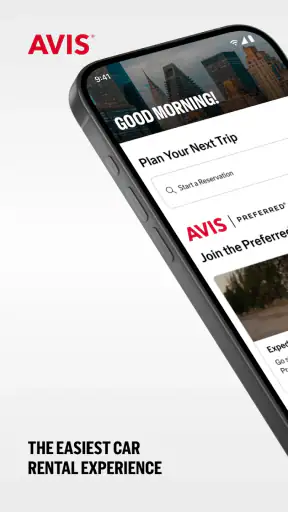
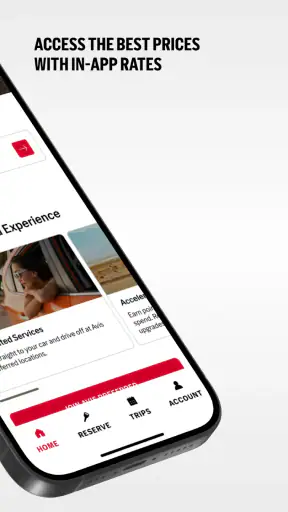
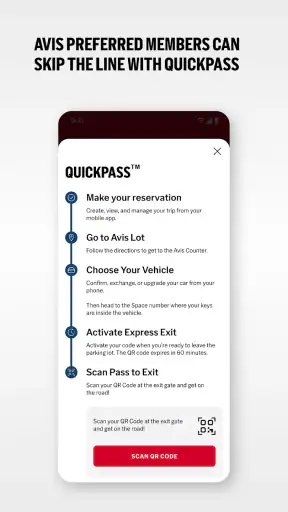

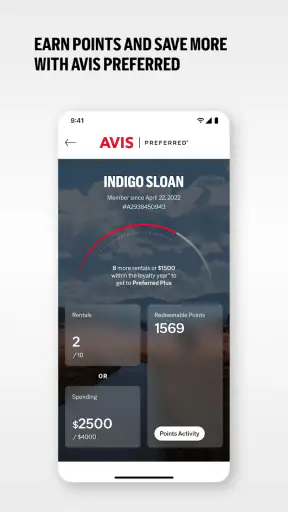
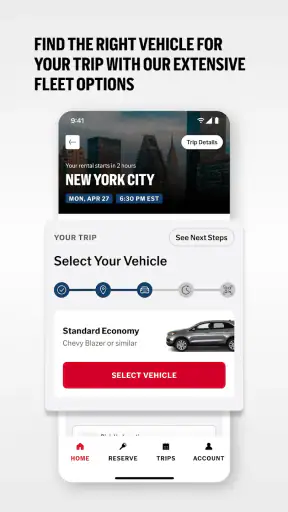
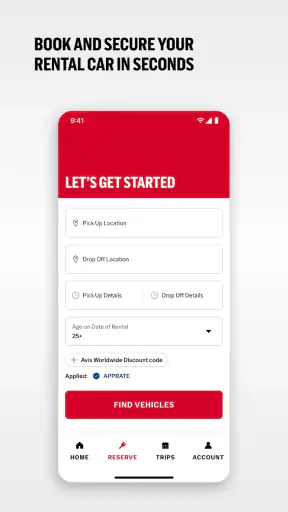
Renting a car sounds simple until the first airport pickup turns into a search for the right reservation, a confusing location choice, or a wait while the phone struggles to connect. I tested Avis Car Rental as a travel and local transportation app, and my overall impression is that it is most useful when I treat it as a preparation and reservation companion rather than as a complete solution to every rental-day problem. It puts Avis car rental tasks in one place, but the quality of the experience still depends heavily on the reservation details, the pickup location, and what is happening at the branch itself.
The app is free, aimed at everyone, and comes from Avis Budget Car Rental LLC. It has been available since March 12, 2012, and the current version is 22.27. Its broad appeal is easy to understand: instead of opening a browser during a trip, I can use a dedicated mobile interface to look for airport or local rentals and keep the process closer at hand. That convenience matters most when plans are changing quickly.
With an average rating of 4.5 from around 42 thousand ratings and more than 7 thousand written reviews, it has clearly found an audience. More than 1 million people have installed it. Those figures do not make every interaction perfect, but they suggest that the app is established enough to be a practical option for travelers who already intend to rent through Avis.
Where the rental process can become confusing
Choosing the right location is more important than it first appears
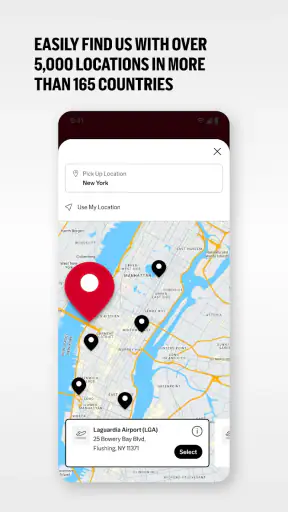
The first place I would slow down is the location search. An airport branch and a nearby neighborhood branch may both look suitable on a map, yet they can lead to very different pickup routines. Airport rentals often involve terminal directions, shuttle arrangements, or a specific return route, while a local office may be easier for someone staying in a city center but less convenient for a flight connection.
I found it helpful to search using the exact airport name or the full address of the place where I actually wanted to collect the car. A broad city search can produce choices that are technically nearby but awkward with luggage or public transport. Before confirming anything, I would check the location label again, especially if the destination has several airports or multiple Avis offices.
This is one of the app’s less obvious trade-offs. A mobile booking flow encourages speed, but rental locations deserve a deliberate check. If I am arriving after a long flight, a few seconds spent confirming the terminal or neighborhood can save much more time later. The app helps me reach the reservation stage, but it cannot make two similarly named branches interchangeable.
Reservation details are easy to overlook on a small screen
Car type, pickup time, return time, and location form a chain. If one link is wrong, the entire plan can become inconvenient. On a phone, I am more likely to skim than I would on a desktop screen, so I make a habit of reviewing the complete reservation before closing the app. I pay particular attention to whether the return location matches the plan, rather than assuming it is automatically the same as pickup.
I also avoid making a last-minute change while standing in a crowded arrivals hall unless I have enough time to read every field. A rushed tap can leave me wondering whether I changed the booking, started a new search, or simply moved back one screen. The app is convenient, but convenience works best when I use it before the travel pressure begins.
Airport pressure exposes the difference between app and branch
A common mistake is to expect the app to control the whole handover. It can support the digital part of the rental journey, but the physical experience still involves the selected Avis location, available vehicles, staff, traffic, signage, and local operating conditions. If a car is not immediately ready or the counter is busy, repeatedly refreshing the app is unlikely to solve that problem.
That distinction is important when deciding whether this is the right tool. I like having a rental app available for searching and organizing a booking. I would not rely on it as my only plan when a delayed pickup could cause me to miss an appointment. For an important arrival, I keep the reservation information accessible and allow extra time for the branch itself.
Setup checks that prevent avoidable trouble
Start with the device and connection, not the reservation
The app supports devices running Android 7.0 or later, which covers a broad range of phones but still makes the operating system worth checking before a trip. If I am using an older spare phone, I would confirm compatibility before leaving home rather than discovering an installation problem at the airport. I would also update the app while connected to reliable Wi-Fi and open it once before traveling.
That first opening is useful for more than checking whether installation worked. I can see whether the sign-in process behaves normally, whether the search screen loads, and whether I can reach the reservation area without mobile network pressure. A successful test at home does not guarantee perfect airport connectivity, but it removes one layer of uncertainty.
Keep the practical information ready
I would prepare the email address or account details associated with the booking and keep the reservation reference available in a separate, easy-to-reach place. This is not about distrusting the app; it is about avoiding a single point of failure. If the phone battery is low, the signal is weak, or the app needs to be reopened, having the important reference nearby makes a conversation with the branch much easier.
I also check the phone’s date and time settings before traveling across time zones. Rental searches are time-sensitive, and a device displaying the wrong local time can make an otherwise correct itinerary feel confusing. The app may show the relevant booking details, but the phone still provides the clock and network conditions that shape how I interpret them.
Do not confuse installation with readiness
Installing Avis Car Rental is only the beginning. I would complete a small rehearsal: open the app, find the intended airport or local office, review the reservation path, and make sure I know where the booking information appears. I would not create a second reservation merely to test the workflow. A simple dry run is enough, and it avoids accidentally producing duplicate plans.
For a family trip, I would also decide who is responsible for the phone and who knows the reservation details. This sounds minor, but it matters when the person holding the device is dealing with luggage, children, or a dead battery. The best setup is not just a working app; it is a workable handoff between the app, the traveler, and the rental counter.
Use the app as part of a wider travel checklist
I would not place the app in the same category as a full navigation service, airline tracker, or roadside assistance tool. Its role is narrower: it supports Avis rental activity. That focus is a strength because the interface does not need to become a general travel dashboard, but it also means I need separate arrangements for directions, flight changes, hotel information, and offline planning.
For airport pickup, I save the terminal information and the route to the rental area before leaving Wi-Fi. For a local rental, I note the office address and opening plan in my travel notes. These steps are especially useful when the rental branch is not close to the place where I am staying. The app can help me choose the rental, while another tool may be better for getting there.
Recovering when the workflow breaks
When a screen does not load
If a page stalls, I first check whether the rest of the phone has internet access. Airport Wi-Fi can show a connection icon while still requiring a browser sign-in, and cellular service can be weak inside a terminal or parking structure. I would move to a place with a stronger signal, close and reopen the app, and try again without repeatedly tapping the same control.
If the problem continues, I would restart the phone before making more complicated changes. I would avoid clearing important app information during a rushed pickup unless I already know how the account and reservation details will be restored. A basic restart is a safer first response because it addresses temporary connection or memory problems without turning a small delay into a sign-in problem.
When the reservation is not visible
A missing reservation view does not automatically mean the booking has disappeared. I would check whether I am using the same account details that were used during the original booking and whether the reservation belongs to the same email address. I would also look through my travel email for the confirmation reference instead of creating another booking immediately.
This is a practical workflow recovery habit that saves money and confusion: verify first, duplicate last. If the reservation still cannot be found, I would contact the Avis location or the appropriate rental support channel with the reference, pickup location, and travel time ready. The app is a useful place to begin investigating, but a branch employee may be the person who can resolve an inventory or booking issue.
When a change appears not to have worked
After modifying a booking, I look for a clear confirmation and then reopen the relevant details. I do not rely only on the fact that the app returned me to the previous screen. If the change concerns pickup time, return location, or a late arrival, I treat it as important enough to verify through the reservation information rather than assuming the first tap completed everything.
If the app behaves differently after a connection drop, I avoid submitting the same request repeatedly. Multiple attempts can make it harder to tell which action succeeded. I would wait for a stable connection, check the current reservation state, and then use the official Avis contact route if the result remains unclear.
When the phone itself is the weak link
Battery drain, storage pressure, an outdated operating system, and aggressive background restrictions can all make a travel app feel unreliable. Before a journey, I charge the phone, carry a power bank, and remove unnecessary pressure from the device. I also avoid testing the app for the first time during boarding or immediately before a scheduled pickup.
These are not glamorous tips, but they are more useful than assuming every error is an application defect. A rental booking is time-sensitive, so a little preparation has a high payoff. I want the app to be one dependable part of the trip, not the only place where the trip exists.
When the app is not the cause
Branch availability can change the experience
The app may successfully display a rental option while the real-world branch is dealing with demand, traffic, a vehicle turnaround, or a queue. Those conditions are outside what a phone interface can fix. If the app shows a reservation but the counter experience is different, I would keep the confirmation details and speak directly with the staff rather than assuming another search will produce a better result.
This is also why I would be cautious about booking with an unrealistically tight schedule. Someone traveling to a wedding, interview, or cruise departure needs more than a technically valid reservation. The most useful choice may be a location with a simpler route, a pickup time with breathing room, or a different transportation option altogether.
Maps and traffic belong to another part of the plan
A rental app can help me arrange a car, but it is not a replacement for route planning. If I am unfamiliar with an airport, I use a navigation app or saved directions to understand how to reach the pickup area and how to return the vehicle. This matters particularly at large airports, where the rental center may not be beside the terminal.
For a short city visit, I would compare the complete journey rather than assuming a rental is automatically convenient. Public transportation or a taxi may be better if parking is difficult, the itinerary stays within a dense downtown area, or I only need a car for one short trip. Avis Car Rental is most valuable when access to a vehicle genuinely improves the plan.
Account and booking expectations need to match
The app is a better fit for people who already know they want to rent through Avis or who are comparing Avis options for a particular trip. It is less suitable as a neutral marketplace for surveying every rental company at once. If my main goal is to compare broad market pricing, vehicle policies, or several providers side by side, an independent comparison service may be more efficient.
On the other hand, once Avis is my chosen provider, a dedicated app is more focused than repeatedly searching the web. I can approach the rental with fewer tabs and less clutter. The trade-off is that I am working within one company’s inventory and booking flow, so I should not expect the breadth of a multi-provider travel site.
Privacy and permissions deserve ordinary caution
As with any travel app, I review what the phone asks for during setup and only enable what I understand to be useful for the task at hand. I do not grant access automatically just because I am in a hurry. I also sign out or protect the device appropriately if I am sharing the phone with other travelers.
This is not a reason to avoid the app. It is simply good travel hygiene. A phone may contain reservation details, email accounts, payment information, and personal messages in one place. Keeping the device locked and the booking reference handled carefully is sensible whether I use Avis Car Rental or arrange the same trip through a browser.
How it compares with the usual alternatives
Compared with using a mobile browser, the Avis app feels more purposeful for a traveler who repeatedly rents from Avis. I do not have to rebuild the context of the rental every time I return to it, and the dedicated format is easier to use when I am checking information between airport tasks. The browser remains a strong alternative when I am on a borrowed device, when installation is inconvenient, or when I need to compare several companies in separate tabs.
Compared with an independent rental marketplace, Avis Car Rental offers less neutrality but a clearer relationship with the Avis booking process. That can be an advantage when I already know the provider and want fewer layers between the reservation and the rental company. It is a disadvantage when price comparison, cross-company availability, or a wide selection of policies is my main priority.
Compared with calling a branch, the app is faster for routine searching and reviewing information outside business conversations. A phone call is still better when the situation is unusual: a late arrival, a reservation mismatch, a location question, or a problem that requires judgment from staff. I see the app and the branch as complementary rather than competing solutions.
My practical verdict after using it
The best way to use Avis Car Rental is as a prepared traveler’s control panel, not as a magic fix for rental-day uncertainty. I would install it before the trip, test the sign-in and search flow, confirm the exact pickup and return locations, and keep the reservation reference available outside the app. That routine addresses the most common friction without overcomplicating the experience.
I recommend it to travelers who prefer Avis, need an airport or local car rental, and want a focused mobile way to manage the booking journey. It is also a sensible choice for anyone who dislikes relying on a browser while moving through a busy trip. The free price removes an obvious barrier, and the Everyone age rating makes it broadly approachable for families and ordinary adult travelers.
I would skip it, or at least avoid making it my primary planning tool, if I am still comparing many rental companies, using an older unsupported phone, or arranging a journey where a branch delay would create serious consequences. In those cases, a marketplace, a desktop browser, public transportation, or a direct conversation with the rental office may be the better answer.
My final judgment is positive but practical. The app does its job best when I give it accurate information and use it early, while recognizing the boundary between digital booking and physical car pickup. It can simplify the Avis side of a trip, especially at the planning stage. It cannot replace a backup reference, sensible timing, route preparation, or human help when the branch situation becomes more complicated.
For that reason, I would recommend Avis Car Rental to the right traveler rather than to everyone automatically. If Avis is already the company I want and my rental plan is straightforward, the app is worth having. If my real need is broad comparison or guaranteed control over what happens at a busy airport, I would pair it with other travel tools instead of expecting one app to carry the whole journey.


